Showing posts with label get free windows phone. Show all posts

pc suite for my htc P3452 phone

HTC PC Suite, aka HTC Sync - rated 5 out of 5
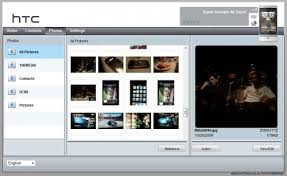
HTC PC Suite is the official software released by HTC for managing their phones. The program is actually called HTC Sync and among others allows you to synchronize Outlook data (contacts or calendar entries) and the browsing bookmarks between your PC and phone. It’s quite easy to use HTC PC Suite, basically once installed you will have to:


  • - connect your phone to the PC (using the USB connection)
  • - define what to synchronize (there’s an wizard that helps you with the synchronization, the Synchronization Settings Wizard), in terms of which applications and what categories
  • - perform the actual synchronization (can be done manually or automatically)

When doing a synchronization not always things will go smoothly, and that’s when synchronization conflicts will occur. However this suite has a Conflict Policy option, that will let you resolve these and choose what version to keep.

The suite offers more though rather than simple synchronization, because if you have apps on your computer that you want to install on the phone, you can manage these directly from the PC suite thus you’ll be able to install multiple apps at once (rather than copying them on the phone and installing from there). And doing this is very simple, you just run HTC Sync and connect your phone, click on Application Installer, select the app to install then click finish.

Advantages for using HTC PC Suite:

  • - It’s an official program released by HTC and provided by default with your microSD card, so phone compatibility won’t be an issue (you can select your phone here)
  • - Offers reliable synchronization between your Outlook data (so no need to use Exchange Server)
  • - It’s free of charge

Disadvantages for using HTC PC Suite:

  • - It’s not as fully featured as PC suites for other phones (for instance Nokia PC Suite)


Publisher’s Description of HTC PC Suite 3.0.5511

HTC PC Suite is a great suite for the HTC phones as it comes with a variety of features starting from phone management to application enhancement features. The application lets you add/edit/delete/browse your contacts, photos, bookmarks, browser history, and media in an easy-to-use interface. You can play any media files directly from the device browser.
Download and use it now: HTC PC Suite 3.0.5511 free download


windows phone flash

If you are like most people today you have a cell phone and like most of us you don't stick with the same carrier forever. When you change carriers you need a phone that will work on their network so you have two choices, buy a phone through your new carrier and get locked into a one or two year contract or use your current phone on their network. For most people the cheapest and best solution is to use your current phone. Thus phone Flashing. Flashing is the process of loading Carrier specific files to handsets from other carriers in order to connect the phone to the new carrier.


What do I Need to Flash My Phone?
1.) Flashing software (which you can download)
2.) A USB cable for the phone you're flashing
3.) A computer with Windows 2000 or Newer, a USB Port, 800Mhz+, 256MB RAM
4.) A CDMA cell phone (see below)
How Difficult is it ?
There are a number of good downloadable cell phone flashing programs out there that will guide you through reprogramming your cell phone to use on many other carriers. If you have basic computer knowledge and a few simple cables almost anyone can Flash or reprogram a cell phone. To begin you will need a Flashing program. Onceyou have the flashing software. Search for the instructions or read me docs with your program and follow them carefully. Look for instruction on your specific phone. This will give you a good overview of what you will be doing. You should be able to complete the process in about ten to fifteen minutes once setup. You will be Flashing a CDMA phone to a CDMA carrier. See a description of the two major networks below.
The Networks
In addition to the list above you will need an account with the CDMA carrier you wish to sign up with. There are two major networks for cell phone carriers. They are GSM or Global System for Mobile Communications. Examples are AT&T, T-Mobile The second CDMA or Code Division Multiple Access.Examples are Qwest, Metro, Sprint and Verizon. These are technologies which essentially allow a mobile device to communicate with a mobile communications network.
How Good Is The Carrier I am Flashing To?
As with most great deals you probable heard about a better carrier through a friend or co-worker. But before you change carriers you should make sure the coverage you are going to is at least as good as your current provider. One way of doing that is compare your current coverage with your new carrier at cellreception.com. Here you can enter in your zip code and get ratings for all carriers in your area along with comments from others using the different cellular services.


windows phone market

Windows Mobile was once the leader in the smartphone operating system space. Over the last few years it has lost significant market share to competitor devices like Apple's iPhone and Google's Android phones, which have grown rapidly due to user demand and developer community support. According to a recent comScore report, RIM is still the most popular mobile smartphone platform in the U.S. with 42.1 percent share of U.S. smartphone subscribers, Apple ranked second with 25.4 percent share followed by Microsoft at 15.1 percent, Google at 9.0 percent and recently acquired Palm (purchased by HP) at 5.4 percent. While the iPhone continues to set new standards and maintain a healthy lead in the market share, Google's Android platform is making rapid gains in the market.


With Windows Phone 7 (WP7), Microsoft is trying to re-capture its market share in the mobile world. Its competitors have made great strides in offering outstanding user interfaces with great features and applications that have seen broad user adoption. Microsoft has acknowledged the importance of end user demand and is focusing on their user experience by creating a new user interface which focuses on information and applications that are most important to users. This 'hub' based user interface gives a fresh look to the design and is a key differentiator from the other smartphone OSes on the market. 'Live tiles' which are dynamically updated provide summarized information people are concerned most about and act as the entry points to the various hubs. The mobile version of IE on WP7 offers a significantly improved browsing experience and like most other smartphones supports multi-touch with pinch and zoom capabilities for ease of browser usability. With additional emphasis placed on social networking, music and gaming, WP7 promises to bring new competition to the top players in the smartphone market by creating a device with the look, feel and features users demand.
The next key driver in the success of smartphones is the variety of high quality third party applications easily available via an online market place. In addition to end user demand, attracting the developer community to develop apps for a device platform is crucial for success. Apple leads the application market with more than 100,000 apps (approved by Apple) in the App Store for iPhone and Google is catching up fast with over 20,000 apps in the Android Market. Microsoft will also provide its own marketplace for ISVs and third party developers to create applications. The platforms for third party applications are Silverlight and XNA that are based on.NET framework, potentially giving Microsoft an edge over its competitors considering that.NET already has a large developer base. Silverlight and XNA are rich modern frameworks that allow developers to easily and rapidly develop compelling applications and games. All the developer tools are available at no cost so developers can download, install and build a rich application in just a few minutes - this gives Microsoft a great opportunity to attract third party application developers. To date, several posts in the blogosphere indicate a positive feedback from the ISV community and third party developers, which are good signs for Microsoft.
Clearly user-friendly OS, plenty of phone applications, and a renewed focus on the consumer market are Microsoft's top priorities with WP7. It will be interesting to see what enterprise features will be available on WP7 and how traditional corporate customers will view the platform. Microsoft is counting on WP7 to be successful and help win back share in the mobile market.
www.platformvision.com
http://blog.platformvision.com
Follow the Platform Vision blog on Twitter at @platformvision.


htc snap

HTC Snap is a Smartphone that has the same features like Blackberry but it runs on the Windows Mobile 6.1 standard operating system. This Smartphone from HTC has a stylish design with a thin built. It has a wide display screen measuring 2.4 inches. This display is a non touch QVGA screen. It has a thumb operated trackball which is used to go through the Windows Mobile 6.1 interface. The HTC Snap measures 4.59 inches by 2.42 inches.
Just like other Smartphones, the HTC Snap has a full QWERTY keyboard which allows easy and fast typing for creating emails and text messages. The QWERTY keyboard has large keys compared to other Smartphones which allows users to type better.


This HTC phone is actually designed and optimized for email and messaging purposes because it features an email filtering program called the Inner Circle. This program filters the emails and lets users concentrate only on emails from contacts that belong to the user's "inner circle". There is even a dedicated Inner Circle button for easy access of important emails.
HTC Snap is one of those great mobile phone deals because it has a lot of features to offer the customers. For people who are always on the go but need to be always online, the HTC Snap can offer a high speed internet with a complete mobile browsing experience. It has a full Wi-Fi connectivity and a high speed HSPDA 3G connection for a faster internet experience.
Aside from internet connectivity, this Smartphone also has a Bluetooth 2.0 Technology for file transfers, sharing, and other purposes. File storage is not a problem because it has a 256 MB ROM, 196 MB RAM, and an expandable memory through the microSD slot which allows up to 16 GB. Storing of music and video files will not be a problem because of its expandable memory. As for the playback of these media files, HTC Snap features a media player that plays music and video files of different formats.
For those who would like to take wonderful photos, the HTC Snap has a 2.0 megapixel camera. This allows users to take pictures as well as videos.
Access to office programs such as Word, Excel, and PowerPoint is also possible through the HTC Phone since it runs through the Windows Mobile 6.1 operating system. In addition to that, it also offers Microsoft Direct Push Technology which allows real time email delivery and automatic synchronization with Outlook.
The HTC Snap is truly a great Smartphone for busy people who are always outside but need to frequently check their emails or browse the web.
DialToSave:
DialToSave brings you the best deals on Mobile Phones, Broadband and Call Rates.
See The Best Deals on: HTC Snap and Mobile Phone Deals


windowsmobile getstarted

With economic doom and gloom surrounding us and the world's economy going down the drain, let me share with you a surefire method of making serious money using your Windows Mobile device. Forex trading or the foreign exchange money market will make you money whether it goes up or down.
I have been playing around with it now for a couple of months. At first there can be a steep learning curve with some costly lessons if you make mistakes through manual placing of orders. You have to know when to get in and when to get out. You can lose your shirt very quickly if you don't know what you're doing.
However, it doesn't have to be like that. Let me share with you an amazing little secret that you will thank me for the rest of your life. It involves what are called Expert Advisors or EAs. These are automated trading programs that do all the trading for you. They are little robots that make money for you while you sleep. They recognize profit opportunities, place orders, whether long or short, place stops for safety, and exit almost always with a profit.
The good news is that you can use your little pocket pal to place and track orders. Mostly all you have to do is check up on your robot to see how your profits are doing.
Note that the markets are open 24 hours a day Monday through Friday so you can relax on the weekends and enjoy your profits for the week.


This past week I made $1837.40 on a $5000 account in five days of trading. On another $5000 account, I cleared $1560.11. Friday I opened another $5000 account and made $351.51 for the day before the markets closed in just 8 hours of trading. Projected over 5 days, that would be $1757.55 for the five day week. So, the total profit would be over $5000 for the week or $20,000 for the month on a $15,000 investment. You can do the math for a year. Not bad in a sagging economy.
Let me tell you what you need to get started. First you must find a Forex trading brokerage to work with so you can open an account. There are oodles of them available. Just Google Forex.
Next you will need to sign up for an account. I strongly recommend that you sign up for a demo account first. Trade for at least a month before you go live or wait until you are confident and know what you are doing.
Then you must download the trading software. There may be several choices depending on the broker you select, but you should select MetaTrader 4-it's free. In my opinion, it is the most sophisticated yet easiest to use. Besides, it is the only one that offers a Windows Mobile version so you can conduct this business on your PDA.
Download and install both the desktop and handheld versions.
Now comes the magic. I highly endorse a program called Maestro. This is an expert advisor that will completely automate your trading. Just plug it in, let it run on autopilot, and watch your profits soar. It will cost you $87, which is the best investment you'll ever make. There is similar software out there that costs much more but is not nearly as effective. This EA really works like magic.
Another hugely important consideration in my opinion is not only that the software works, it is all set up and optimized for you right out of the box. You do not have to tweak the settings, which can be a continual bother. Just follow the simple installation instructions, and you will be making money in no time. It's truly amazing.
You have nothing to lose because there is a 60 day money back guarantee. If you are not satisfied, and I can't imagine why you wouldn't be, you can ask for a full refund no questions asked.
Visit my blog to learn how to obtain a copy of Maestro, install it, and be in business in a matter of minutes.
You can forget about the wimpy stock market, tanking real estate, and every other pathetic form of investment. If you've been wondering where to put your money that will give you a decent return and recover your losses, the Forex market with Maestro in the place. And what's really great, is that you can do it with your phone from anywhere in the world. It doesn't cost a fortune to get involved either. Start with a little as $300 and watch it grow to $3000 before your eyes, in your hand, on your Windows Mobile cachinger.
Timothy Hillebrand, Ph.D. is a retired archaeologist and windows mobile expert who writes for Smartphone & Pocket PC magazine and several other publications. Visit his blog at http://professorpocket.blogspot.com/ His most recent blog deals with running a home business on autopilot at http://www.theperfecthomebusiness.wordpress.com


Samsung Galaxy Note Launched on O2 Deals

The new Samsung Galaxy Note is by far the largest screened smart phone to be released by Samsung and sets a new precedent in the market by almost crossing over to the tablet form of an iPad 2 or Samsung Galaxy Tab.
This new flagship smart phone from Samsung boasts an amazing 5.3 inch touch screen display which is a full 0.6 inches larger than the nearest competitors such as the HTC Sensation XL or HTC Titan.
Samsung Galaxy Note deals were originally released on the Orange UK network last week which gave consumers a good idea of the pricing structure of this mammoth new phone, on Orange it is possible to pick up a free Galaxy Note from £41 line rental per month which puts it firmly in the iPhone 4S price bracket.
This new Galaxy smart phone has now been launched on a range of O2 deals in the UK which has further backed up the price point of the phone, it is not yet possible to order a free Galaxy Note on the O2 network which says quite a lot as even top models like the HTC Sensation XE, Samsung Galaxy Nexus and Motorola RAZR are all available free on tariffs from the operator.


As it currently stands, the cheapest deal for a Samsung Galaxy Note on O2 will cost the consumer an upfront price of £209.99 plus a monthly line rental charge of £21.50 per month, this equates to a total expenditure of £725.99 over the minimum term 24 month contract period.
Compare this with the best deal on the Orange network which currently costs £229.99 upfront and then £20.50 line rental each month over 24 months with an overall outlay of £721.99 and we get a good idea of the real cost of this high specification smart phone.
So why is the Samsung Galaxy Note such an expensive phone?
Aside from the large touch screen which uses Super AMOLED technology this new phone packs in Samsung's fastest processor to date, a dual core 1.4GHz chip powers this slim but large handset along with a huge 2500 mAh battery.
Other features include the new Samsung instant messaging service which operates very much like the Blackberry Messenger and iMessage services and is called 'ChatON', also on board is 16GB of expendable memory and the usual Android features such as Wi-Fi, GPS, Bluetooth and 3.5G data support.
The Samsung Galaxy Note comes pre-loaded with the latest Android 2.3 operating system, however it has now been confirmed that this will be upgraded to the new Android 4.0 software after the new Samsung Galaxy Nexus has launched and other handsets are allowed to receive the upgrade.
On the reverse of the Galaxy Note is an 8 mega pixel camera which allows for video capture at full 1080p HD quality and on the front of the phone is a 2 mega pixel camera for video calls, this is a very high specification handset packing some of the latest technology and features hence the price tag is likely to stay above many other models for some time.
If you would like to see the latest Samsung Galaxy Note deals or take a look at the new Samsung Galaxy Nexus deals as they are released then please feel free to head over to our website: Phones Limited.


O2 iPhone 4S Deals Finally Launched for Non Existing Customers

The brand new iPhone 4S has now been on sale since the early part of October 2011 but one mobile network has been missing from the portfolio of deals on offer for this latest iPhone.
Up until today, consumers have been able to order iPhone 4S deals on Orange, Vodafone, T-Mobile and 3 Mobile but the O2 network took a very different decision with their limited stocks of this latest Apple phone, instead of offering deals to everyone as with the other networks they decided to only offer the new iPhone 4S to their existing customers as an upgrade.
This has been the case since the launch of the iPhone 4S with many disgruntled and mystified consumers unable to understand why they could not order a brand new iPhone on the O2 network, well the day has now come where this has all changed and surprisingly it is not offered directly from the operator.


An independent mobile phones retailer is the first to break cover with new O2 deals for the iPhone 4S, although not as competitive when it comes to owning the phone free of charge with a contract deal there are some lower line rental options that do compete well with the other networks.
One in particular is on the O2 100 tariff which for £21.50 per month provides 100 minutes of calls, 500 text messages and 500MB of internet access every month and demands an upfront fee for the iPhone 4S of £299.99, equated of the minimum term contract period of 24 months this totals £815.99 making it the third cheapest deal available for the latest iPhone.
For those not wanting to pay an upfront price for the latest Apple phone there is an O2 contract deal with a line rental charge of £47 per month with 1200 minutes of calls, unlimited SMS and the same 500MB of data on offer but total this deal up over the 24 months and the consumer is looking at spending a staggering £1128, that is a whole £312.01 more expensive.
That said, the lower line rental deal may not be suitable for some users as the lower 100 minutes of calls offered may be exceeded before the end of the month, when choosing a deal for the new iPhone 4S consumers need to try to match their usage requirements as closely as possible to negate any extra charges for exceeding their allocated calls, text and data volumes.
It is also expected that the white edition of the iPhone 4S as well as the 32GB and 64GB models will also soon be offered on the O2 network as the independent retailers start to collate their deals.
To see the new O2 iPhone 4S deals or to take a look at the recently discounted iPhone 4 deals please feel free to browse our website: Phones Limited.


updates for windows phone 7

This year will feature the debut of an entirely new mobile platform from Microsoft. Windows Phone 7 represents a major departure from its predecessor. Don't let the small numeric change from 6.5 to 7 fool you, this is a completely new operating system. As such, owners of previous devices prior to Windows Phone 7 will not be able to use their legacy apps. Let's take a look at the must have applications for Windows Phone 7.
Microsoft is well aware of the importance of social networking in our society. In particular, having a Facebook application is critical to the success of any new mobile platform. Windows Phone 7 is built to be a very capable when it comes to social networking. In particular, the operating system includes what Microsoft is calling the People hub. Essentially, it has Facebook updates built into the operating system. Facebook will stream updates to people within your contact list. Updates from Facebook will also show up on your home screen, making it easy to interact on the world's biggest social network.


Yet another popular social network is Twitter. Microsoft decided not to include a Twitter application with Windows Phone 7. Luckily, there are several developers who will have Twitter apps available when phones are available for sale. Seesmic is bringing their familiar Twitter app to to the new platform. Other options include an application called Twitt. You can check your Twitter feed, post tweets in addition to adding photos. You'll want to add a Twitter app to your new phone and there will be a few options available in Microsoft's Marketplace, which is their version of Apple's App Store.
Having a rich history of gaming with Xbox 360 certainly provides Microsoft with a few advantages when it comes to delivering a rich gaming experience for mobile devices. Microsoft themselves have in-house development teams responsible for popular gaming franchises like Halo. In addition to Halo Waypoint for Windows Phone 7, there are plenty of great games that will take advantage of the processing power of your new phone. Microsoft announced a list of 63 launch-ready games. Fans of classic gamers will want to download Castlevania. If you enjoy arcade-style racing, Asphalt 5 from Gameloft will showcase the graphics and fulfill your need for speed.
Your new Windows Phone 7 phone will ship with applications on the device and plenty of options to download apps from the Marketplace. Many applications offer a limited time trial, which allows you to try before you buy. With a robust selection of apps both pre-installed and ready at launch, there should be plenty of applications to keep you busy and allow you to enjoy your new phone.
Michael has a great love for mobile gadgets. When not spending time with his family, you can often find him discussing the latest technology in the Windows Phone forums.


how to update phone

Microsoft was sitting quietly for many times after an early lead on mobility with its older mobile operating system giving advantage to Apple iPhone and Google's Android OS. But now the Big Daddy is back! Microsoft has come up with a new series of mobile phones based on Windows Phone 7. It is a complete make-over of earlier version of Microsoft's mobile operating system.


Windows Mobile 7 is phone for those who love net surfing, gaming and music. The new animated tile-based interface is loaded with lots of features. The main highlight elements of Windows Mobile 7 are- 
  • Navigation by Search is easier with a dedicated button & Maps. Windows Mobile 7 are the only phones with pre installed search powered with Bing. The Maps application solves the location and direction issues.
  • Windows Mobile 7 acts as people hub. Social networking through Facebook and Windows Live feeds to keep you updated all the time. Managing pictures are eased with Windows Live solution. You can control your mobile and track the location through Find My Phone service on Windows Live.
  • The revolutionary Me card makes you update your status or change profile picture on various social networking sites just from your phone.
  • First time Outlook on Mobile in WinMo 7 enables you to manage e-mails easily by reducing clutter. You can get the whole experience of managing e-mail accounts as like on your laptop and PC.
  • Win Mobile 7 supports multiple Microsoft Exchange accounts for work.
  • The Live calendar in the right of the Start screen gives the detailed information of event; even you can map appointment locations. This is not all...if you happen to stuck in some problem like traffic, you can send a pre-written "I'm running late" mail at just one touch.
  • The new Windows mobile 7 is a big boon to those who are continuously on foot but can't afford to stay away from internet. The most popular Internet browser, Internet Explorer installed in the phone enables browsing a pleasurable experience. You can open six websites in six different tabs and work on them simultaneously hopping from one another.
  • Here Mobile Gaming is like icing on the cake. Windows Mobile 7 has many exclusive EA games especially designed by Electronic Arts Inc. (EA) for Windows Phone 7 which adds to the portfolio of Xbox LIVE titles of Microsoft. So enjoy word games, strategy, or action according to your liking.
  • Windows Phone 7 can also be called the Office Mobile because this has mobile versions of office management tools like MS-Office which would ensure that your work doesn't interrupt even when you are on move. You can make notes in OneNote Mobile.
  • You can play songs on Zune Audio and Video Player by syncing your mobile with PC. You can also play streaming video on high-res screen or buy new tunes from Marketplace, customize playlists and listen to podcasts. One can go for a subscription of Zune Pass from where you can get unlimited music for very low monthly fee.
Latest WinMo 7 Phones
Many companies have launched or pipelined the launch of Windows Mobile 7, HTC being the leader of all. Some of the foremost ones being Samsung Focus, LG Quantum, HTC Surround, HTC Mozart, HTC HD7 and Dell Venue Pro.
Windows Phone 7 or Windows Mobile 7 is described in full detail - people hub, email, Facebook usage, phone apps are described in detail http://www.winmobile7.mobi/
To know about other mobile such as Google smart Phone, Apple iPhone - set up, pictures, communication are described at http://www.pocket-pc.mobi/


how to update windows phone 7

It was only a matter of time before the world's largest software producer got in on the mobile OS market again. The Windows Mobile series had one advantage over the iPhone when it launched and that was the apps. Then iPhone got apps and Mircrosoft was left in the dumps. Windows Phone 7 was a clean break from that and it was the right decision. Microsoft has correctly decided that what is going to make or break their new OS is going to be the Windows Phone 7 apps and how they stack up against the competitors


Old Windows Mobile apps will not work though, but it's for the best. Microsoft Windows Mobile is outdated and the clean break was probably the only possibility of getting up to speed with the iPhone and Android.
The basic premise for the apps will be 'hubs', for example a 'People' hub, a 'Pictures' hub, a 'Games' hub and so on. Windows Phone 7 looks great and a really nice feature is that the apps are actually active even in their 'tiled' and minimized type. Everything looks clean, crisp and kind of zoomy, kind of like in Windows 7. The Office Outlook app alone is almost worth it. It simply looks great and makes you wonder how someone can read email on a Blackberry phone! Not every day, you praise a mobile email client is it? The main hubs are all well designed and useful.
The other standard apps are also quite impressive. The one feature that is very innovative and useful is the 'People' hub that allows you unrestricted access to all of your social networks - at once! One screen with all updates from your friends and one place to update your status. Credit where credit is due, this is a very impressive feature that is genuinely helpful in connecting you with your friends.
Games will be another selling point for Microsoft. Of course, anything that mentions X-Box on it, will get gamers talking, but you won't be playing Halo 3 just yet. The future of mobile gaming is on smartphones though and Microsoft has recognized this. Windows Phone 7 apps are mainly made with Silverlight which has earned a reputation for great graphics. Add to that the integration with X-Box Live and things are looking very interesting indeed.
How things will turn out for Microsoft in the end depends on how consumers will react. Apps developers will not want to design for a platform that no one use and consumers won't buy a platform with no apps.
For the latest news, updates and cool Windows Phone 7 Apps visit http://www.1800pocketpc.com/, your guide to everything Windows Mobile!


windows phone software update

HTC HD 7 is a smart-phone running Windows Phone 7 operating system. There are too many things that can be discussed about this set. However, I will review only the important hardware and software aspects of this mobile phone.
I have been using this phone for a few months and I am writing this review to help people who are just thinking to switch to HTC HD 7. I hope this review will be insightful.
First Look
As you might have also seen the images of HD 7 smart-phone, the set has a large display screen (4.1 inch) while it weighs 162 grams (5.7 ounces). To say it shortly the phone has an elegant look and feel.
What it feels to hold it?
If you are an iPhone user, you might feel that HTC HD 7 is a little bigger and slightly heavier. Some people might feel enjoy the change, however, others might deem it bulky. In my view a few days usage will make you quite habitual of using it and you will not feel uneasy.
The Touch Factor
Every smartphone that I used taught me a lesson that the touch screen shall be smooth. I can testify here that the touch screen of HTC HD 7 is second to none.


Is it easy to use the tiles-based Windows Phone 7 home screen?
One thing that you will notice that Windows Phones have come with a brand new style. The icons are displayed in tiles shape and touch-screen scrolling works vertically rather than horizontally as in iPhones and Android based smart-phones. I found this style very useful and efficient.
Texts and Writing Editor
Messaging editor in HD 7 has a splendid auto-correct option which makes it very easy to write messages. Similarly if you are searching or writing a few emails you will find the writing editor a great assistant.
Speed
Speed is of primary importance in mobiles. The set in our case is fast and reliable. The 1Ghz processor allows the tasks to be done at speed of light.
Zune and Updates
You will need to install Zune software on your PC or MAC to synchronize your phone with your system and update it whenever the new updates are dispatched by Microsoft.
The Apps
The Windows Phone marketplace is a growing repository of applications made specifically for Windows Phones. All important applications are present in the market which you can use in your HTC HD 7 Phone.
The above review is based on usage aspect. I have tried to make it non-technical. If you are eager to learn about the newest Windows Phone 7 applications and other important news please join this Facebook Fan Page: http://www.facebook.com/pages/Windows-Phone-Apps/198373060181263


htc desire s

Almost everyone has been talking about HTC Desire S since its release last April. This phone offers tons of features that make it a top favorite among mobile aficionados. In fact, a number of phone users have shifted from iPhone and Blackberry to smartphone. The list of the specification of the Desire S looks great. However, some people are also particular with how their phone looks. The reviews have called the Desire S as one slump of a metal. The phone already looks classy. But what if you would want to get it funky?
A wide range of mobile phone accessories has been made available. Many merchants have capitalized on the different preferences of each phone users. There are specific accessories that are intended for particular phone units. This is due to the difference in the shape, width, height and thickness of the phone. For HTC Desire S users, they can enjoy custom-made accessories for their phones. There is a screen protector for example which can be the shield of your 3.7" screen against substances that can ruin your phone. If you are the type who is always on the move, you can protect your phone with a case.


Cases come in different designs and colors. You may choose one that suits your personality. It is made up of various materials but the most common is rubber. Since it is soft, it will not bring about dents on your HTC Desire S. Some cases even have a protective film so that it will not easily wear out. In addition, it will cover all the ports and it can seal out liquids so you can be certain that your phone will be safe from harmful elements.
If you want to stick with the classy look of your phone, there are cases that are clear. There are also protective cases that will not require you to disassemble the current case of your phone. There are variants that fit perfectly into the shape of the original case and can be easily snapped onto the front and back part of your HTC Desire S. most of the time this snap-ons are made out of plastic
Passive repeaters for an HTC Desire S phone can also be bought. This is applicable to businessmen who are always making a call on their wheels. The passive antenna repeater can boost the signal sent and received by your phone while you are on the road. This will lessen the number of your dropped calls due to choppy lines. You just need to attach it to the rear window of your car so no need to drill and put some wires.
Installation is so easy. You would not need to hire someone else to do it. In addition, it works on multitude frequencies. It can significantly lessen the loss of signal, fade, cutoff and static. You do not need to lose a critical phone call or email with a passive antenna repeater. If you want to know more about other accessories that will fit to your HTC Desire S, visit a local store near you.
There are some great HTC Desire S deals or you may want to consider grabbing a iPhone 5 contract.


htc desire hd

If you want to be noticed different than the crowd, HTC Desire HD is a perfect choice for you that will leave a sensational impression over the people of your circle. HTC has bestowed this rattling widget with
Android v2.2 (Froyo) OS, 3G network facilities, huge set of peachy features and a mind-blowing touchscreen display.
Extraordinarily Stupefying at Looks
Well, appearance of this staggering smartphone deserves users' appreciation because this heavyweight handset looks simply eye-catching carrying 164 grams heavy casing with 123 x 68 x 11.8 mm proportions. The highly advanced 4.3 inches S-LCD capacitive touchscreen is HTC Desire HD's awesome feature that will give a better output with 480 x 800 pixels resolution and compatibility of 16 million colors. Other remarkable facilities include accelerometer sensor for UI auto-rotate, proximity sensor for auto turn-off, multi-touch input method and HTC Sense UI.
Top-drawer Camera & Storage Capacity
8 MP camera is not a common thing for a mobile phone that this one has brought with Auto Focus, Dual LED Flash, Face Detection, Pinch to Zoom, Photo Geo Tagging & Photo Effects functions & features. It can serve you amazingly 3264x2448 pixels resolution photographs and 720p moving video footages. Let's now talk about the capability of its storage department, 1.5 GB built-in memory with 768 MB RAM and 32 GB external support is truly unbeatable.


Fantabulous Social networking & Internet Services
HTC Desire HD is fabulous smartphone that is wonderful at social networking due to possessing Facebook, Flickr and Twitter applications with YouTube, Google Talk and Picasa integration. To provide more power to this groovy gadget, HTC has blessed it with Adobe Flash 10.1, HTML web browser and Internet techniques viz. 3G HSDPA & HSUPA, Wi-Fi (DLNA), GPRS, EDGE, Gmail & Google Search. HTC Desire HD also integrates A-GPS navigator, digital compass, dedicated search key and Maps.
Peachy at Entertainment
This mind-blowing device has been embedded with 3.5 mm audio jack support, Dolby Mobile and SRS sound enhancement supported music player and video player. MP3, WAV, MIDI, AAC, OGG & WMA9 audio and MPEG4, 3GP, 3G2 & WMV9 video files will be playable on HTC Desire HD. Besides, Stereo FM radio with RDS facility, downlodable games and data transmission techniques (Bluetooth & USB) can also be utilized on this rattling gizmo.
LG KS365 Deals, LG Optimus E900 [http://www.bestdealsmobile.co.uk/mobiledeals.asp?id=lgoptimuse900] are the popular Mobile Phones and these phone contracts are available on Online Mobile Phone Shop UK.
Faith Hill is Search Engine Marketing Consultant for Cheap Mobile Phone Contract UK.


windows phone sales

Common Cell Phone Features And How To Market Them
People love to buy cheap phones because a great deal on a phone packed with functions saves them money.
Online auction sites such as eBay are perfect for resellers that know their phones. Online venues are frequented by people looking for solid deals.
That means you can find a ton of potential customers. But, you do need to be knowledgeable about the most popular features and accessories since customers will ask you about them. When consumers see you are knowledgeable on your subject, you will discover they are more inclined to purchase.
10 Common Cell Phone Features
G-Sensor:
The G-Sensor is a gravity sensor that is built into the phone which serves the purpose of presenting a landscape or portrait screen image.
This is a hardware device that does not require any special operations. Users certainly appreciate its presence since it keeps images stable.
It can be marketed with an icon on pictures or a multiple step picture which shows the phone in both portrait and landscape mode.
Media Player:
This is software downloaded on a cell phone designed to play audio and video files.
Consumers enjoy the information and entertainment that they can derive from having it on the phone.
Again, this eliminates the need to find a PC or carry a laptop to play files. Just be aware that not all phones have all of the codecs installed that might be used with music files in the person's music collection. In fact, if phones can handle some of the more highly regarded codecs like OGG, FLAC and FLV it is often worth mentioning in descriptions.
Internet Connectivity:
This is a software and hardware function in the phone that allows it to connect to and browse the internet.
With cheap phones this is achieved in one of two ways. It can be done either through a WiFi connection or through WAP and GPRS services.
With Wi-Fi the phone connects to nearby Wi-Fi router and gives you access to internet.
With WAP or GPRS the cheap mobile phone connects to the internet via the cell phone network.
When marketing either WAP or WiFi be sure to test the functionality yourself and warn customers about potential issues like encrypted Wi-Fi networks and unruly GPS providers.
Activesynch:
A hardwire system that allows for connecting a phone to PCs or laptops. Files can then be easily transferred from one device to the other.
This is most commonly found on cheap phones with Windows Mobile OS systems but can be found in some other systems as well.


TV Receiver:
Certain cheap phones can pick up TV signals if their phone is provided with a TV receiver.
Those that wish to pick up broadcast channels will certainly appreciate such a receiver since they can watch their favorite channels.
However, the signal must be accessible to the location of the phone in order for this function to work.
Another problem, particularly in locations which have switched over to completely digital signals, is that analog TV receivers will no longer work. Be sure to put which countries the TV receiver will work on when listing the phone.
FM Receiver:
Do you want to listen to the radio but don't have one available?
You don't need one if your phone has a FM receiver.
Yes, a solid FM receiver can pull in all manner of FM signals in a manner similar to TV receiver. There will certainly be more FM channels available than there are TV channels.
This means you will get a lot of listening enjoyment out of your cell phone. Just be mindful that the FM signal has to be available for the phone to pick it up.
Consumers must be aware of potential signal limitations.
Java Apps:
These applications make it possible to run Java software.
All you need to do is download the proper apps and then install them.
Such apps open the door for expanded functions on the phone.
Not all Java files work on all Java compatible phones so it is best to test some and then either include them on the phones or as an easily accessible download.
Handwriting Recognition:
Are you someone that really does not like to type a lot of text?
With cell phone handwriting recognition on cheap China phones, you will not have to.
All you need to due is use a "pen" and "write" on the touchpad of the phone. The "writing" that you do will then be converted to text on the phone.
Consumers will love this if they are not fans of typing on the classic QWERTY keyboard model.
For those perpetually in need of writing shorthand, this can be a great accessory.
Be sure to tell consumers they need to manually save their newly created text documents to avoid file mishaps.
Wi-Fi:
Wireless internet connection that allows use to browse internet on a phone; it is easy to use and convenient.
Basically, following on screen connection commands is all that is needed to make it work.
Be sure to test the Wi-Fi functionality yourself to ensure that it works well.
Productivity Tools:
These tools are designed to backup and personalize the content of a cell phone. Such tools allow for greater organization of content.
Be sure to include screenshots of their location in the description and instructions on how to use them.
No one can be expected to read these items and memorize them in one reading.
So, re-reading and reviewing them is advised.
When compiling and Ebay listing, please be sure to mention you will respond to inquiries within 24 hours. This will give you the leeway of performing a day's worth of research to ascertain an answer.
Get the cheap phones with the best features. Check out Chinavasion.com or paste this link into your browser: http://www.chinavasion.com/index.php/cName/mobile-phones/


LinkWithin

Related Posts Plugin for WordPress, Blogger...