Showing posts with label games for windows mobile phones The Excitement of Mobile Phone Games. Show all posts

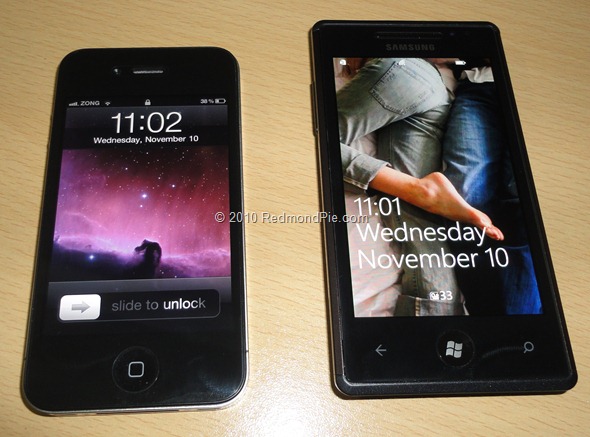
The Samsung Omnia 7 Is Powered by the New Windows Phone 7 OS


Samsung conquered the high-end smartphone segment with the Samsung Galaxy S, but the Windows smartphone segment is something that the company has failed to make a presence at all. The Samsung Omnia 7 is the phone that will be making its presence in this segment that is expected to grow significantly after the launch of the new operating system from Microsoft. The Samsung Omnia 7 will be one of the first phones in the world to be running on the Windows Phone 7 operating system, which was recently announced by Microsoft. The Windows operating system is something that is so powerful that ordinary phones cannot run this operating system. It will give a measure of the phone's performance.


It will be having a 4 inch display to show off the latest operating system from Microsoft. The touch screen display will be capacitive and is capable of supporting a lot of multi-touch actions. Also, given the fantastic animations and the cool interface that Microsoft has provided in the new operating system, this will be much more useful than in other phones. The resolution of the screen will be 480 x 800 pixels, which will be one of the perfect resolutions to display this new operating system. It is expected to be provided with a massive 8 GB or 16 GB memory option. The phone will be not having any additional memory card slots, but the internal memory itself will be more than sufficient to handle all of your entertainment and business needs.


The five megapixel camera is one of the premium entertainment features in the phone. It is a pretty similar to the camera that is found in many other smart phones that will be featuring the Windows operating system. This is because Microsoft has made all of the phones that will be running on this new operating system to be having the same features in terms of specifications. This is done in order to reduce the variations between two Windows smartphones. The camera will be coming with options like the autofocus, LED flash to go along with the 720 p HD video recording option. The HD videos will be recorded at a frame rate of 25 frames per second, which will bode well when viewed on the large screen televisions. Another thing that is common between this new Samsung Omnia 7 and the other Windows smartphones will be the 1 GHz processor.
The processor configuration that Samsung will be using in their phone is slightly better than the configuration that is seen in the phones. This explains the reason for the Samsung phone to be extremely faster at running the animations on the phone. Animation is one of the key features of the Windows smartphone and there is no better than the Samsung Omnia 7 at running this. The phone is currently available in the United Kingdom for a price tag of just £ 25 per month with contracts from various network providers. The phone is also available without contracts.
At Best Mobile Contracts we compare Samsung Omnia 7 on contract from all the major online retailers. Compare the best mobile phone deals at Best Mobile Contracts. We search and compare the compare mobile phone deals from the major UK online retailers, using our unique mobile phone comparison algorithms.


windows phone themes

There is lots of mobile which are operating on windows operating system. To enhance their capability Microsoft has announced their next generation operating system windows 7. Lots of mobiles companies opted this system for their better working feature and expand their mobile quality. This new fresh approach towards new software by the Microsoft will make the company bring together lots of exciting features like Xbox LIVE games and the Zune music and video experience on a mobile phone, exclusively on Windows 7 Mobile Phones Series. Phone companies are started to build up their phones with this software.


Each windows phone 7 series mobile phone comes with an excellent button for bing that link with the hardware system. So user will just one click away from anything they want to search in their phone. This Bing button gives most relevant browsing results both local or web, which depends upon what query wants user from the handset. The innumerous Windows 7 Mobile Phones consist six hubs, which built on specific themes which used most by the user. Those hubs are:
1. People - This hub connects peoples from each other that include their feeds from local networks and photos. It also gives facilities to post updates to facebook and windows live in one step.
2. Pictures - That gives facility to user to share pictures and video to a social network in one step.
3. Games - This the most unique hubs that gives first and only official Xbox LIVE experience on a phone, including Xbox LIVE games, Spotlight feed and the ability to see a gamers avatar, Achievements and gamer profile.
4. Music + Video - Users can use his/ her media experience through this hub into a social one with Zune Social on a PC and share their media recommendations with those people which are music lover.
5. Marketplace - User can upload all the application and games through this hub.
6. Office - With this hub user will have the access to office, one note and share point workspace in one place.
Torie Wilson is associated with Mobile Phone Shop UK and write articles for Windows 7 Mobile Phones [http://www.mobilephoneshopuk.net/windows-7-phone.html]. Get more information on Windows 7 Contract Phone and Mobile Phone Deals here.


windows mobile 5.0


It's possible that advances in the Windows Mobile OS are somewhat dependent on the gaming community.
We certainly have a few innovations that warrant a robust, stable OS capable of high-level API coding to partake of the best of the Pocket PC gaming realm.
The desktop PC owes a debt of gratitude to gamers. Unless, of course, you think that the user base was doing nothing else but playing with their MS Office apps on a routine basis.


The large drive towards hardware and processing power innovation is driven by folks largely like myself.
Video card manufacturers like ATI and nVidia have been posting record sales of high-end 3D hardware acceleration cards for years, with desktop PC gamers more than willing to pony up over $600 CDN on the next massively multipipelined hardware behemoth.
The Windows Mobile world can hardly be called a parallel gaming universe.


A lot of frustration has been thrown Microsoft's way, largely because of recent developments. The hx4700 is a case in point.
Hewlett Packard's only VGA display handheld was hampered by a revelation: no Windows Mobile 5.0 upgrade could be issued for this device until the following spring.
You'll find more details on the Brighthand.com site regarding this upgrade insight.
Problem is, the mettle of the hardcore Pocket PC game community is lacking. A recent poll off of the IPaqHQ forum site revealed that only just over five percent have opted for a Pocket PC with Windows Mobile 5.


The greater majority is still on WM 2003 Second Edition. The Pocket PC game community has spoken, and by and large they are satisfied with the game power harnessed by devices utilizing this brand of operating system.
The Windows Mobile Team Blog entry was an epiphany of sorts. Mike Calligaro's Windows Mobile article blog spoke to issues concerning disparaging Micro$oft detractors who insist on transposing those dollar signs in the middle of the company name.
His formula is as follows:
(Total cost of doing the upgrade) / (number of people who will use it) = (unreasonable price)
In essence, he attributes our PDA gaming community upgrade woes to diseconomies of scale, not greed.
I agree with Mike's view because the dearth of hardware accelerated Pocket PC games speaks volumes.
The newer accelerated titles like GeoRally EX are less prevalent than new software rendered 3D titles like FFRace - Fast Future Race.
Even more revealing the former is targeted once again towards Axim x50v owners. If that in itself doesn't reek of a lack of PDA hardware compliancy, I don't know what does.
I've dubbed this the PlayStation 2 syndrome: just like the popular gaming console, Pocket PC game developers are catching on to making the most of the programming libraries at hand and producing top-notch games that can be used from Pocket PC 2002 onwards.
With such a broad compatibility demographic, I've already seen it; Pocket PC game production is issuing better games for common operating systems and is possible nearing its zenith for quality.
If things continue like this it will certainly put a crimp on our future Windows Mobile upgrades.
________________________________________________________________
Damian Julien is a Pocket PC gaming authority and long time general gaming hobbyist and reviewer.
He is an IT specialist by trade and has posted numerous articles on Pocket PC emulators, gaming and trends in the industry.


htc snap

HTC Snap is a Smartphone that has the same features like Blackberry but it runs on the Windows Mobile 6.1 standard operating system. This Smartphone from HTC has a stylish design with a thin built. It has a wide display screen measuring 2.4 inches. This display is a non touch QVGA screen. It has a thumb operated trackball which is used to go through the Windows Mobile 6.1 interface. The HTC Snap measures 4.59 inches by 2.42 inches.
Just like other Smartphones, the HTC Snap has a full QWERTY keyboard which allows easy and fast typing for creating emails and text messages. The QWERTY keyboard has large keys compared to other Smartphones which allows users to type better.


This HTC phone is actually designed and optimized for email and messaging purposes because it features an email filtering program called the Inner Circle. This program filters the emails and lets users concentrate only on emails from contacts that belong to the user's "inner circle". There is even a dedicated Inner Circle button for easy access of important emails.
HTC Snap is one of those great mobile phone deals because it has a lot of features to offer the customers. For people who are always on the go but need to be always online, the HTC Snap can offer a high speed internet with a complete mobile browsing experience. It has a full Wi-Fi connectivity and a high speed HSPDA 3G connection for a faster internet experience.
Aside from internet connectivity, this Smartphone also has a Bluetooth 2.0 Technology for file transfers, sharing, and other purposes. File storage is not a problem because it has a 256 MB ROM, 196 MB RAM, and an expandable memory through the microSD slot which allows up to 16 GB. Storing of music and video files will not be a problem because of its expandable memory. As for the playback of these media files, HTC Snap features a media player that plays music and video files of different formats.
For those who would like to take wonderful photos, the HTC Snap has a 2.0 megapixel camera. This allows users to take pictures as well as videos.
Access to office programs such as Word, Excel, and PowerPoint is also possible through the HTC Phone since it runs through the Windows Mobile 6.1 operating system. In addition to that, it also offers Microsoft Direct Push Technology which allows real time email delivery and automatic synchronization with Outlook.
The HTC Snap is truly a great Smartphone for busy people who are always outside but need to frequently check their emails or browse the web.
DialToSave:
DialToSave brings you the best deals on Mobile Phones, Broadband and Call Rates.
See The Best Deals on: HTC Snap and Mobile Phone Deals


HTC Sensation XE Deals on O2

The new HTC Sensation XE has now been released in the UK on the full range of O2 pay monthly contract deals which allow for consumers to order this latest Sensation smart phone from HTC without having to pay any upfront costs.
O2 tariffs start at just £10.50 line rental per month and although the lower charge packages do require an upfront payment for the phone can still work out more cost-effective over their minimum term contract period, however many consumer look for deals that include the phone free of charge and O2 provides this at only £21.50 per month.
This is one of the lowest tariffs currently available from any of the UK network operators that provides a free HTC Sensation XE phone, the tariff is called 'O2 100' and it includes 100 minutes of calls that can be used to call any network at any time.


Also included are 500 text messages for those that like to send SMS to their friends and family and a generous 500MB of data which provides for internet access, email, downloading new applications and updating of many of the phones features.
The HTC Sensation XE is an Android phone which means that it heavily relies on an internet connection for updating things like news, weather and applications, this can be performed either via Wi-Fi or when this is not available via a 3G connection which is why the inclusive data that O2 offers is so important.
The user can also add extra data to their O2 tariff with 'Bolt Ons', these extra packages offer up to 1GB of inclusive internet access every month for an extra £10 fee, this particular tariff already has a 500MB 'Bolt On' included so an extra 500MB would cost just £4 extra.
Aside from the data 'Bolt On' there are also a selection of other services that can also be added to the users account with their HTC Sensation XE, these include extra MMS, 'Data Abroad', Insurance, Calls to Abroad and Calls back to the UK.
Further to this, O2 categorises their customers based on their monthly expenditure and then offers them 'O2 Rewards', this means that they always give anything they offer to new customers to their existing customers as well as letting bigger spend customers upgrade early and receive handset discounts when upgrading.
The HTC Sensation XE is available across a number of the UK networks, these currently include Orange, T-Mobile, Vodafone and 3 Mobile as well as now being offered as a Pay As You Go and SIM free phone.
If you are looking for the very latest HTC Sensation XE deals or even the new iPhone 4S deals as they are launched then please feel free to have a look at our website.


Samsung Galaxy Note Launched on O2 Deals

The new Samsung Galaxy Note is by far the largest screened smart phone to be released by Samsung and sets a new precedent in the market by almost crossing over to the tablet form of an iPad 2 or Samsung Galaxy Tab.
This new flagship smart phone from Samsung boasts an amazing 5.3 inch touch screen display which is a full 0.6 inches larger than the nearest competitors such as the HTC Sensation XL or HTC Titan.
Samsung Galaxy Note deals were originally released on the Orange UK network last week which gave consumers a good idea of the pricing structure of this mammoth new phone, on Orange it is possible to pick up a free Galaxy Note from £41 line rental per month which puts it firmly in the iPhone 4S price bracket.
This new Galaxy smart phone has now been launched on a range of O2 deals in the UK which has further backed up the price point of the phone, it is not yet possible to order a free Galaxy Note on the O2 network which says quite a lot as even top models like the HTC Sensation XE, Samsung Galaxy Nexus and Motorola RAZR are all available free on tariffs from the operator.


As it currently stands, the cheapest deal for a Samsung Galaxy Note on O2 will cost the consumer an upfront price of £209.99 plus a monthly line rental charge of £21.50 per month, this equates to a total expenditure of £725.99 over the minimum term 24 month contract period.
Compare this with the best deal on the Orange network which currently costs £229.99 upfront and then £20.50 line rental each month over 24 months with an overall outlay of £721.99 and we get a good idea of the real cost of this high specification smart phone.
So why is the Samsung Galaxy Note such an expensive phone?
Aside from the large touch screen which uses Super AMOLED technology this new phone packs in Samsung's fastest processor to date, a dual core 1.4GHz chip powers this slim but large handset along with a huge 2500 mAh battery.
Other features include the new Samsung instant messaging service which operates very much like the Blackberry Messenger and iMessage services and is called 'ChatON', also on board is 16GB of expendable memory and the usual Android features such as Wi-Fi, GPS, Bluetooth and 3.5G data support.
The Samsung Galaxy Note comes pre-loaded with the latest Android 2.3 operating system, however it has now been confirmed that this will be upgraded to the new Android 4.0 software after the new Samsung Galaxy Nexus has launched and other handsets are allowed to receive the upgrade.
On the reverse of the Galaxy Note is an 8 mega pixel camera which allows for video capture at full 1080p HD quality and on the front of the phone is a 2 mega pixel camera for video calls, this is a very high specification handset packing some of the latest technology and features hence the price tag is likely to stay above many other models for some time.
If you would like to see the latest Samsung Galaxy Note deals or take a look at the new Samsung Galaxy Nexus deals as they are released then please feel free to head over to our website: Phones Limited.


O2 iPhone 4S Deals Finally Launched for Non Existing Customers

The brand new iPhone 4S has now been on sale since the early part of October 2011 but one mobile network has been missing from the portfolio of deals on offer for this latest iPhone.
Up until today, consumers have been able to order iPhone 4S deals on Orange, Vodafone, T-Mobile and 3 Mobile but the O2 network took a very different decision with their limited stocks of this latest Apple phone, instead of offering deals to everyone as with the other networks they decided to only offer the new iPhone 4S to their existing customers as an upgrade.
This has been the case since the launch of the iPhone 4S with many disgruntled and mystified consumers unable to understand why they could not order a brand new iPhone on the O2 network, well the day has now come where this has all changed and surprisingly it is not offered directly from the operator.


An independent mobile phones retailer is the first to break cover with new O2 deals for the iPhone 4S, although not as competitive when it comes to owning the phone free of charge with a contract deal there are some lower line rental options that do compete well with the other networks.
One in particular is on the O2 100 tariff which for £21.50 per month provides 100 minutes of calls, 500 text messages and 500MB of internet access every month and demands an upfront fee for the iPhone 4S of £299.99, equated of the minimum term contract period of 24 months this totals £815.99 making it the third cheapest deal available for the latest iPhone.
For those not wanting to pay an upfront price for the latest Apple phone there is an O2 contract deal with a line rental charge of £47 per month with 1200 minutes of calls, unlimited SMS and the same 500MB of data on offer but total this deal up over the 24 months and the consumer is looking at spending a staggering £1128, that is a whole £312.01 more expensive.
That said, the lower line rental deal may not be suitable for some users as the lower 100 minutes of calls offered may be exceeded before the end of the month, when choosing a deal for the new iPhone 4S consumers need to try to match their usage requirements as closely as possible to negate any extra charges for exceeding their allocated calls, text and data volumes.
It is also expected that the white edition of the iPhone 4S as well as the 32GB and 64GB models will also soon be offered on the O2 network as the independent retailers start to collate their deals.
To see the new O2 iPhone 4S deals or to take a look at the recently discounted iPhone 4 deals please feel free to browse our website: Phones Limited.


updates for windows phone 7

This year will feature the debut of an entirely new mobile platform from Microsoft. Windows Phone 7 represents a major departure from its predecessor. Don't let the small numeric change from 6.5 to 7 fool you, this is a completely new operating system. As such, owners of previous devices prior to Windows Phone 7 will not be able to use their legacy apps. Let's take a look at the must have applications for Windows Phone 7.
Microsoft is well aware of the importance of social networking in our society. In particular, having a Facebook application is critical to the success of any new mobile platform. Windows Phone 7 is built to be a very capable when it comes to social networking. In particular, the operating system includes what Microsoft is calling the People hub. Essentially, it has Facebook updates built into the operating system. Facebook will stream updates to people within your contact list. Updates from Facebook will also show up on your home screen, making it easy to interact on the world's biggest social network.


Yet another popular social network is Twitter. Microsoft decided not to include a Twitter application with Windows Phone 7. Luckily, there are several developers who will have Twitter apps available when phones are available for sale. Seesmic is bringing their familiar Twitter app to to the new platform. Other options include an application called Twitt. You can check your Twitter feed, post tweets in addition to adding photos. You'll want to add a Twitter app to your new phone and there will be a few options available in Microsoft's Marketplace, which is their version of Apple's App Store.
Having a rich history of gaming with Xbox 360 certainly provides Microsoft with a few advantages when it comes to delivering a rich gaming experience for mobile devices. Microsoft themselves have in-house development teams responsible for popular gaming franchises like Halo. In addition to Halo Waypoint for Windows Phone 7, there are plenty of great games that will take advantage of the processing power of your new phone. Microsoft announced a list of 63 launch-ready games. Fans of classic gamers will want to download Castlevania. If you enjoy arcade-style racing, Asphalt 5 from Gameloft will showcase the graphics and fulfill your need for speed.
Your new Windows Phone 7 phone will ship with applications on the device and plenty of options to download apps from the Marketplace. Many applications offer a limited time trial, which allows you to try before you buy. With a robust selection of apps both pre-installed and ready at launch, there should be plenty of applications to keep you busy and allow you to enjoy your new phone.
Michael has a great love for mobile gadgets. When not spending time with his family, you can often find him discussing the latest technology in the Windows Phone forums.


phone 7 update

Microsoft has a brand new smartphone platform that they are hoping are worthy challengers to Apple's iPhone and Google's Android platforms.
New Design and User Interface
The first thing Microsoft has executed correctly is throw out the clumsy Start menus, folders and files to establish a splendid amalgamated hub arrangement fortified by a series of 'live' tiles that are cleaner and more dynamic for the phone user.
The phone offers a sleek and minimalistic 2-column design that's not only incredibly easy-to-use but also lets you receive the latest updates from your social network at a glance.
Navigation is also smooth and visceral by way of sliding, scrolling left to right, tilting and swiping to view the robust content on your phone.
What's most attractive is that everything on the Start screen is customizable and constructed entirely around the user experience.
Can't get through the day without calling your beloveds at least five times? Just 'pin' them to your Start screen and you can reach them with a tap of your finger, without needing to go through your address book or to do a search.
Each tile can represent anything you wish be it a contact, your favorite web page, a song, application or even a hub. Rearrange them any way you like or remove one merely by long-tapping a tile and choosing to unpin it.
A tap on the arrow at the top of the screen fetches you a list of all your applications. One downside is that there's no way to sort or categorize these apps and so the screen gets pretty littered once you install many of them.
A big positive for Windows Phone 7 is how it seamlessly incorporates social activities within six hubs - People, Pictures, Games, Music + Video, Office and the Marketplace.
If you are acquainted with the Zune HD music player, navigating through the WP7 hubs becomes even mere child's play. Both devices are defined by 'Metro', a typography-based design by Microsoft, which has large type fonts, a panoramic design, clean colors and fluid animation.
People Hub
Everything you need to know about your friends and family can be found in the People hub as the phone automatically streams information about them from assorted sources such as Facebook or their email accounts. This is a function also offered by phones like HTC Sense.
Call, text, email your friends or check their most recent status update from Facebook simply by tapping on a particular contact.
Merely scroll across the hub to see 'what's new' for everyone's Facebook updates.
Pictures Hub
As with the People hub, all your photos (including albums from your Facebook account) can be revealed. They're displayed in little thumbnails and visible by date or favorites. Scroll to see your friends' latest uploads and even comment on them if you wish.
Capture those quick moments on the go simply by pressing the shutter button to activate the camera even when the phone is off or locked, and you're ready to snap as soon as the phone's out of your pocket.
Once you're finished, WP7 uploads and shares your pictures automatically on Facebook or SkyDrive, a Windows Live file storage and sharing system.


Games Hub
Several notable Microsoft features have also been integrated into the phone and they include a mobile Office suite, Zune entertainment platform and of course, the highly anticipated Xbox LIVE.
The avatars are highly endearing - you can tickle or hit him/her, or shake the phone and watch them fall to the ground with a anguished expression. If you have the Xbox LIVE hub pinned to your Start menu, your avatar will even pop up occasionally before disappearing back into the tile.
Basically Xbox presented in a mobile format, the Games hub lets you play your favorite games, look through Spotlight for the latest updates or check up on your friends' or your own achievements and gamer profile.
While there are only over 60 game titles according to PC World, the fact is incorporating Xbox LIVE games will offer users rich graphic and gaming experiences.
Music + Video Hub
Don't despair if you are unable to get your hands on Microsoft's Zune player, as phone users can now enjoy the same music and video features of the Zune HD thanks to Windows Phone 7.
Syncing music is just a matter of drag and drop, though users will need to download the Zune desktop software. Apple users can also rest assured that using WP7 will be a breeze as Microsoft has derived a basic compatible software called 'Windows Phone 7 Connector', which allows users to synchronize multimedia content from iTunes or iPhoto to the phone.
Office Hub + Calendar
View, edit, share and sync your Excel, Word or PowerPoint documents with your PC. However, only simple edits are possible with editing options being rather basic: format, highlight and alter font colors. What's fresh here is the powerful OneNote application, which allows you to make notes, do voice recordings or even snap pictures when necessary. The calendar's also pretty sound and lets you plan your daily agenda complete with colored labels in relation to the urgency of the task at hand. You can also look at your calendar by month to find those free days when you can hang out with friends and family.
Marketplace Hub
As with any smartphone, the phone is not complete without apps, and WP7 users can download everything they require for music, games, entertainment, news, sports and more through the marketplace. The apps are sorted between free and paid.
It will be a while though before Microsoft can catch up to the huge app libraries that make smartphones like the Apple iPhone such great winners.
Microsoft has recently hit the 1000 app milestone while Apple has reported a total of 300,000 apps.
However, featured apps like Twitter, IMDB and eBay, are already on Windows Marketplace while more developers, such as EA Mobile, are jumping aboard to publish a slew of Xbox LIVE games for WP7 users.
In Summary
Microsoft has gained several favorable reviews from critics and deservedly so.
In a world where connectivity and speed is everything, Windows Phone 7 has proven to be a huge enticement for social- and multi-media phone junkies, especially with the integration of Xbox LIVE and Zune.
Some beefs however are that users need to sign up for a Windows Live ID to gain total access to phone features such as SkyDrive or Zune. Fortunately, signing up is easy enough even if you are a Gmail email user.
Critics have also sounded off about the lack of a copy and paste function (which will be solved with an update early next year), video chat functions and the inability to multitask when it comes to third party applications.
Generally speaking though, those who want something fresh will enjoy the new Windows Phone 7.
For more relevant information on Windows Phone 7 including apps, reviews, and news visit http://windowsphone7reviews.net


windows phone update release date

In October, hordes of Apple enthusiasts waited on queue outside for stores eager to get their hands on the new iPhone 4S. Although it took people hours to purchase the new phone, they didn't seem to mind since the iOS-powered handset was reward enough. Once they finally purchased the phone, jubilation could clearly be seen in their faces. However, after just a few days of using their new smartphone, they quickly realized a few problems.
Although not all users experienced issues, a number of users complained about a number of problems surrounding their new handsets. One of the problems was a short battery life. The phone did not last as long as expected. Another problem was white noise that affected voice calls. At first, it was reported that the problem occurs when headphones were plugged in. However, later reports revealed that it affected calls whether headphones were plugged in or not. The last problem was inadequate Wi-Fi connectivity and a weak phone signal.


At first, no one really knew what was going on. It was later revealed that there were issues with the software. One user updated his 4th generation iPhone to the latest iOS 5 software. This caused the problems to occur. Once he downgraded to the iOS 4, the problems ceased. Once he upgraded again, the problems re-occurred.
This is proof enough that the iPhone 4S was suffering from software problems. The Cupertino firm acknowledged the problem and later rolled out the iOS 5.0.1. Many thought that this would address the issues surrounding their new smartphone. However, users reported that it made the problem worse. Users who did not experience problems in the past were now experiencing issues.
According to reports, Apple is currently working on the iOS 5.0.2 to address the issues with their new software. Although they did not mention when this patch would be rolling out to the iPhone 4S, we believe that the company will waste time in issuing the update.
These days, there is a larger focus in offering handsets that sport more powerful hardware and software. Despite offering a better mobile experience, this will also put a large strain on the phone's batteries. Furthermore, the software is new. Like any new operating system, a few bugs should be expected.
Currently, resolving these issues is Apple's top priority. So, expect the Cupertino tech giant to roll out the iOS 5.0.2 update for the iPhone 4S soon.
For the best iPhone 4S deals and iPhone 4 deals, visit us at PhonesLimited.co.uk.


windows 7 update

Windows 7 is a wonderful operating system. It is beautiful, fast and is packed with very interesting features. However, all this does not means that it is without its problems. Users have reported a number of problems including problems with updates, interface, etc. In this article we will try to cover some of the common Windows 7 update problems, but before we go into further detail, a general point to be remembered is that the first thing one should do when encountering a problem is to check out the Windowsupdate.log file. This file contains a lot of important information that will allow understanding of the problem.


First, let us talk about a few Windows 7 update problems related to update of the SP 1. Sometimes, the Windows 7 service pack 1 update fails. The solution to this problem largely depends on what type of error you are receiving. Before doing anything specific, you can attempt to clear the problem through two generic solutions. Firstly, you can try fixing the problem using the Windows' troubleshooter: click on the Start orb, select Control Panel > Troubleshooting and there the Fix problems with Windows Update link. Secondly, you can try the System Update Readiness tool for Windows 7. You can download the tool from the website of Microsoft. The code for the update is KB947821. Download the tool compatible with your system (32-bit or 64-bit). This tool checks your system for inconsistencies that are hindering the update process.
Windows 7 update problems can some time also spring up due to your browser. It has been reported that Windows fails to update with a beta version of Internet Explorer 8. The error encountered is as follows "The site cannot continue because one or more of these Windows services is not running," Error number: 0x8DDD0018. A workaround that has been suggested is that you set the 'Automatic Updates' and 'Background Intelligent Transfer Service' to automatic.
Windows 7 update problems can also present themselves because of connection problems to the update server. Windows update is known to use its own proxy server which can interfere with the update process. Often, changing this server can solve the problem. Here is how: Start Menu> Accessories> command prompt> right click> run as administrator> Enter [netsh]> Enter [winhttp]> Enter [import proxy source=ie]. This will import the proxy setting of Internet Explorer (direct access or configured proxy) and should solve the problem.
Here is a simple and free utility included in Windows you may wish to try: CHKDSK in Windows 7. For a complete guide to computer hardware, support, software, virus detection, spyware removal, check out PC Support Hub.


windows mobile compatible phones

Mobile phone manufacturers have incorporated Microsoft Windows OS over their mobile phones to come up with highly efficient devices. HTC Pure and Sony Ericsson Xperia X1A are two devices based on Windows mobile OS. Lets find out what makes these devices so impressive.The HTC Pure is a fantastic handset based on Microsoft Windows Mobile 6.5 Professional and feature highly efficient Qualcomm Processor. The device features a 3.2 inch display screen which offers a high resolution of 480 x 800 pixels. The TFT touch screen displays 65K colors with bright and vibrant pictures. The display screen comes with accelerometer and handwriting recognition. The built-in TouchFLO 3D swipe navigation gives users a wonderful experience while navigating through the functions.
The handset is equipped with a Touch sensitive zoom bar for getting a better view.This 3G enabled window mobile phone features high speed data upload and data download technologies namely HSDPA and HSUPA which facilitates the video calling function. The phone is integrated with wireless Wi-Fi technology which allows data connectivity through local hotspot or WLAN. The phone also comes with Bluetooth and miniUSB for transferring data to other compatible devices. The Class 10 GPRS and EDGE technologies amount for excellent connectivity in the device.
The smartphone features a 5MP camera which offers a high resolution of 2592 x 1944 pixels. The camera comes with an autofocus. One can adjust focus through Touch focus as well. The phone captures videos of VGA format at 15fps. It is compatible with Tri and Quad bands hence allows international roaming. There is a GPS navigator which allows one to access maps of unknown places. Window mobile phones like this one feature fantastic user interface which a user finds familiar to the that of PCs or laptops.The HTC Pure is an amazing world class mobile phone which is an absolute entertainer. It features motion based gaming, Stereo FM radio and an MP3 player.


The phone comes with Pocket Office application which allows one to access files like Word, Excel, PowerPoint, OneNote and PDF viewer. The handset is provided with a microSD card for expanding the memory storage area.Sony Ericsson Xperia X1A is another 3G enabled windows mobile phone which comes equipped with Windows Mobile 6.1 Professional. The handset looks absolutely stunning with a 3.0 inch TFT touch sensitive screen that comes with a resolution of 800 x 480 pixels and shows 65K. The handset features a full QWERTY keyboard which eases data input while writing mails or messages. One can navigate through the beautifully displayed functions conveniently over it with the help of an Optical trackpad available over the device.
The device comes with superb entertainment features like an MP4, MP3 and AAC compatible music player. The games available over it are great fun and there is an Stereo FM player for listening to one's favorite programs. It also has polyphonic and Mp3 ringtones as well as a composer which gives good ringing sound when there are any incoming calls or messages. This light weighted and compactly sized phone comes with a high speed Internet connectivity. It is equipped with high speed 3G HSDPA and HSUPA which supports the video calling process. The device comes with enhanced network technologies like EDGE and GPRS. The phone features international roaming. It allows one to access Internet from all over the world through the built-in wireless Wi-Fi technology, provided the device is within the range of local hotspot or WLAN.
The 3.2MP camera with high resolution 2048 x 1536 pixels available over the device takes fabulous pictures. Pictures can be watched over the Picture Editor provided in the phone. The camera records quality videos and features functions like Touch focus, LED flash and autofocus. There is a separate camera for video calling. The device features Push email, Email and instant messaging. One can even access document files like Word, Excel, Powerpoint, OneNote and PDF viewer. The battery provided over the handset allows it to work for 10hrs. A microSD card slot provided in the device enhances memory capacity of the device.Thus we can conclude that the window mobile phones are capable of easy to operate and perform better amongst their other counterparts.
Samule Herick is an expert author of telecommunication industry. For more information about latest Windows Mobile Phones like T-Mobile MDA CompactV, Acer X960. Visit our online shopping portal at http://www.mobilejazz.co.uk.


windows media player for mobile phones

There's been a constant criticism that Android powered smartphones don't have a desktop interface similar to iTunes, but the truth is that Android devices can comfortably sync to Windows Media Player in more or less the same manner as the iPad and iPhone. If you use Windows regularly then you can be able to transfer music your PC and your phone.
Android devices are intended to be self-reliant and that's why you will be pardoned to think that your droid is not syncing with Windows as they do not ever depend on desktop synchronization. In fact, they sync to windows similar to any other media player. Provided you set the smartphone suitably, you can drag files about in Windows Media Player and sync media libraries between your PC and your Android phone automatically.
If you're connecting your Android for the first time, you will most likely see a small autorun dialog box that will prompt you to install the drivers for your smartphone or possibly a small assistant app that is preloaded on your phone. Depending on the phone's manufacturer, the method may be different.


Look out for any prompts asking you to download and install other software from your wireless carrier. Such apps are not good since their work it to mainly grasp any extra penny from users and not really to help sync your phone to your PC. Close any browser tabs that come up with invitations to download the junk. You will see a control window panel for your phone once you finish the installation.
If the Windows Control Panel doesn't appear, go to 'Devices and Printers' and check for your handset's listing there. On the device control panel, there are a couple of options for managing the contents: 'Manage media on your device', 'Browse files', 'Import pictures and videos' and 'change general settings.' Other devices have additional options but those are the important ones. Apps for managing music and photos will be automatically set as default by Windows but if you wish to make changes you will just click change program under each option. For this process allow the Windows Media Player and Windows Live Photo Gallery to be defaults.
To transfer pictures and videos you have on your phone's gallery double click import pictures and videos. Windows will by default search the camera roll of your phone. You can input tags if you want and then click OK to commence the import. To delete files from your camera, check the box or keep them by leaving the box unchecked just like with any other digital cameras. An Explorer window will open to display what you have transferred once you are through with importing.
Music that is not in your Windows music library but in your phone can be also transferred through to selecting your device from the list on the left plane; select music and then highlight and drag all the files into a box marked 'Drag items here.' Transfer them by clicking on Start sync.
Once you are through with moving the files, right click the drop down menu under Sync tab and on the right side of the window click set up sync. This will open a new window that may prompt you to choose the way data already in your device will be handled. To avoid Media Player from cleaning out your phone's data card, select the option where your data will be left on your device. On the subsequent screen name the device and then click finish to kick off the sync. You will now see the media collection on your Android phone equal your library. From there every time you connect your Android smartphone to your PC, if there any changes in either of the libraries, Windows Media Player will update as dimmed necessary.

android on windows mobile phone

Are you looking to fall in love with your next phone? Well, here's your opportunity! The Gphone G2, a new smart gadget that fits everybody's needs, is sure to never fail in thoroughly suiting you. This high-tech Smartphone has everything you could ask for in a phone, and more.
We're all fans of Google, so who wouldn't want a phone that runs Google Android 1.6? Oh, and did I mention it also runs Windows Mobile 6.5? So basically, this phone has the perfect operating system of all buyers' dreams.
So with all these features and amazing technology you may be wondering what happens if you run into trouble. Fortunately, you needn't worry about something simple like that. The phone just so happens to come with Quadband phone support for anywhere in the world. You'll never have troubleshooting problems again!
Well, what kind of features does this awesome phone come with? The true answer would take to long to list, but there are a decent amount of highlights that haven't already been mentioned. To start, the Gphone G2 comes with the ability to connect to WiFi, so whenever you're in a hotspot, you're sure to have quick internet access.
Ever have those picture-perfect moments when you knew you should have brought your camera, and can't stop regretting leaving it behind? You'll never have to have that worry again with the Gphone G2 and it's built in 2.0 mega pixel camera! Always have your perfect memory-saver in your pocket without losing room because it's part of your phone!


This phone is also perfect for listening to your favorite music, and even watching your favorite videos. Not only does its media player support both MP3 and MP4 files - the Gphone G2 also comes with FM radio support! You'll be guaranteed to be able to listen to your music and watch your videos on the go, without worry. And no more need to carry around a clunky iPod, since this Smartphone covers it all!
With GPS voice navigation support built in to your new Gphone G2, you'll never be lost again. Look up directions at home before a trip or on the go with this quick and easy-to-use GPS system, no worries needed.
And that's not nearly all. Did you know that the Gphone G2 runs tons and tons of applications on it? Remember those times when you really wished you could communicate with somebody, but didn't have the means to? Go through that no more with your new Smartphone, which comes with MSN, Skype, and e-mail function, not to mention all are free of charge. The Gphone G2 also runs Windows Office, consisting of Word, Excel, and PowerPoint. So basically you can create documents on the go!
Worried about where to store all this data? Well don't be! The comes with 2GB of memory. Not enough for you? Just upgrade to a 4GB or even an 8GB SD card and you'll have more room than you could have ever wished for.
The Gphone G2 can be purchased for the incredibly low amount of $207.00. Fall in love with your phone today!
To view video, close up photos, full specifications, and real time rock bottom pricing on the Gphone G2.
Please visit http://www.cndigit.com/ More Phone Reviews visit our Blog http://blog.cndigit.com


games for windows mobile phones

Several years back, the mobile handset could was originally created for key functions such as SMS or text messages and making calls. These days, a mobile phone is bought not only for its communication-related faculties but for the better enhanced features that it holds. One feature that is prominent from among many is the gaming feature simply because it appeals to persons of all age groups. Before, mobile phones only offer basic Snake games. It was the earliest mobile game bedded into Nokia units and the game has turned into one of the most favored videogames in the world. However due to the diligence and expertise of game techies and pacesetters, people can now enjoy advanced mobile games anytime.
Generally, mobile games are video games played on feature mobile phones, smartphones, Personal Digital Assistants and handheld PCs. Games are played through the technologies embedded on the phone itself. Networked gaming utilizes a range of technologies and these consist of GPRS location identification, multimedia message, and short message service. Non-networked applications employ the unit program to process the gaming software. Games are normally included on the device, loaded into the device by means of memory card or Bluetooth, or embedded on the devices by the operator or Original Equipment Manufacturer.
Mobile games are made available through the utilization of trendy platforms including Symbian, Palm, Windows Mobile, and Java. At first, Java is known as a computer programming language and that was the most widespread platform used for mobile games. But, several binary formats were also accepted to develop more sophisticated mobile games.


Java Mobile Games
A good number of the earlier mobile games such as Galaxian and Pac Man were 2D games having plain interface thus, user interaction was quite limited. However, with Java the world of mobile gaming transformed. Today, the majority of the games are greatly absorbing three dimensional (3D) games that boast of the capacity to function on a multi-player format.
There is a wide selection of Java mobile games available. If you want engaging and action filled games, you can go for Java action games. Check out what's obtainable for your mobile phone model and then download your favored exploits. If you are more into mental challenge, then test yourself with stimulating puzzle games such as Minesweeper, Soduko, Bublex, and the like. Love sports? Then engage in many sports mobile games including tennis, football, basketball, and many more.
NBA Smash Mobile Game
Basketball enthusiasts will be thrilled with the popular Kobe Bryant java game. And if you already tried playing Kobe Bryant game, you will be more electrified with NBA Smash. NBA Smash allows user to play more like in the street-type basketball court. It carries the similar keys that the Kobe Bryant mobile game has. The NBA Smash has great graphics and background like that of a usual street basketball courts with spectators. With NBA Smash, the player can easily focus on the game as only two players are to be dealt with rather than five. And because you only have a couple of players, the characters are bigger.
It also offers varied game play modes including challenge, exhibition, tournament, and career mode. The career mode permits you to select a team. Then, you can produce players as well as select their knacks and looks. You can also opt for your teammates from among a group of players. NBA Smash is a fantastic mobile game worth trying.
For more information on Trust SMS and Messaging Destination please visit our website.


LinkWithin

Related Posts Plugin for WordPress, Blogger...