Showing posts with label activesync windows 7. Show all posts

apps for windows phone


Windows Phone may be the newest smartphone development platform, but it has already taken significant market share and poses a big competitive threat to iPhone, Android, and BlackBerry. While market share is still comparatively smaller, it won't take Microsoft long to at least come to parity, if not to exceed, the market share of the other three major players.


A big advantage of Windows Phone is simply the familiarity of the interface. With Microsoft being the dominant platform for operating systems and productivity software, there is a comfort factor that the others cannot approach. Like other development platforms, Windows Phone lets developers create business and consumer applications to run on a Windows Phone.
It is built using existing Microsoft tools, including Expression Blend, Silverlight, Visual Studio, and the XNA Framework. While the XNA Framework is used for loop-based games, Silverlight is more appropriate for event-driven app development. As a result, developers who are already steeped in Microsoft technology will have no trouble getting started creating apps for the Windows Phone without having to face a learning curve.
An advantage to the end user is the runtime services on the device, which can be used to gain access to cloud-based services including Windows Azure or Xbox LIVE. It does offer end users the opportunity to enjoy very feature-rich applications with a familiar interface, as well as support for data across multiple devices. For developers, Microsoft Phone offers a strong developer portal, as well as an application marketplace to make it easier to market commercial applications.
From a developer perspective, there are four separate components, starting with the Runtime-on screen which includes the Silverlight and XNA Framework. This area includes a protected sandbox. Second, the toolset that includes Visual Studio and Expression blend, for quickly creating apps. Cloud Services include Windows Azure, Xbox LIVE, and notification and location services. And lastly, portal services give developers an easy workspace for registering, certifying, and marketing their apps. This also includes a business intelligence section, which gives developers in-depth reports about their apps.
Developers will find Windows Phone application development easy, particularly since it does not incorporate any new languages, rather, it just relies on existing frameworks adapted for the smartphone. Developers can program with C# and the.NET framework.
The rich and familiar development environment means that app developers will be able to create very useful and convenient apps for end users, that leverage an attractive feature set. Some of the newest up-and-coming features on the Windows Phone include the ability to copy and pasate text between emails, text messages, web pages, and Office Mobile. Users will also find that response time for all apps and games is very good, and that the marketplace offers an impressive set of apps for quick download.
Zdenek Hejl is specialist at Memos Outsourcing. Memos Outsourcing is custom software development company based in Prague and Minsk, Belarus. If you demand quality custom mobile application development at affordable price please contact us.
                                                     

windows 7 phone review


HTC HD 7 is a smart-phone running Windows Phone 7 operating system. There are too many things that can be discussed about this set. However, I will review only the important hardware and software aspects of this mobile phone.
I have been using this phone for a few months and I am writing this review to help people who are just thinking to switch to HTC HD 7. I hope this review will be insightful.


First Look
As you might have also seen the images of HD 7 smart-phone, the set has a large display screen (4.1 inch) while it weighs 162 grams (5.7 ounces). To say it shortly the phone has an elegant look and feel.
What it feels to hold it?
If you are an iPhone user, you might feel that HTC HD 7 is a little bigger and slightly heavier. Some people might feel enjoy the change, however, others might deem it bulky. In my view a few days usage will make you quite habitual of using it and you will not feel uneasy.
The Touch Factor
Every smartphone that I used taught me a lesson that the touch screen shall be smooth. I can testify here that the touch screen of HTC HD 7 is second to none.
Is it easy to use the tiles-based Windows Phone 7 home screen?
One thing that you will notice that Windows Phones have come with a brand new style. The icons are displayed in tiles shape and touch-screen scrolling works vertically rather than horizontally as in iPhones and Android based smart-phones. I found this style very useful and efficient.
Texts and Writing Editor
Messaging editor in HD 7 has a splendid auto-correct option which makes it very easy to write messages. Similarly if you are searching or writing a few emails you will find the writing editor a great assistant.
Speed
Speed is of primary importance in mobiles. The set in our case is fast and reliable. The 1Ghz processor allows the tasks to be done at speed of light.
Zune and Updates
You will need to install Zune software on your PC or MAC to synchronize your phone with your system and update it whenever the new updates are dispatched by Microsoft.
The Apps
The Windows Phone marketplace is a growing repository of applications made specifically for Windows Phones. All important applications are present in the market which you can use in your HTC HD 7 Phone.
The above review is based on usage aspect. I have tried to make it non-technical. If you are eager to learn about the newest Windows Phone 7 applications and other important news please join this Facebook Fan Page: http://www.facebook.com/pages/Windows-Phone-Apps/198373060181263
                                                       

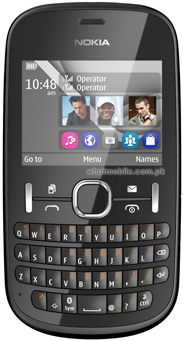
Nokia Asha 200 Price and Specs

Rs. 6,750
USD $75
Nokia Asha 200 Price Pakistan


VideoVideo Rev
Specs & Features Post Comment  View all Comments   
 Whats New?Nokia Asha 200 - Colourful QWERTY. Easy Swap Dual SIM.
Nokia Asha 200 features: A colourful QWERTY phone with Easy Swap dual SIM. Use the Easy Swap function of Nokia Asha 200 to swap multiple SIM cards on the go. Use the QWERTY to message fast. The Nokia Asha 200 makes staying in touch easy. Use your favourite email accounts, chat quickly, & update Facebook & other social networks right from your Nokia Asha 200. Enjoy the enhanced stereo FM radio & record songs straight to your Nokia Asha 200 with FM recording. WithNokia Asha 200 there's a lot to discover, so get ready to explore.  
 Dimension115.4 x 61.1 x 14 mm, 47.7 cc  
 Weight 105 g  
 Battery Talk time Up to 7 h, Stand-by Up to 552 h, Music play Up to 52 h  
 OS S40 Asha (Dual SIM) 
 Memory 10 MB built-in, 32 MB RAM64 MB ROM + microSD card (supports up to 32GB) 
 Connectivity Bluetooth v2.1 with A2DP, EDR, USBGPRS Class 12 (48 kbps), EDGE Class 12  
 Display Size 320 x 240 pixels, 2.4 inches (~167 ppi pixel density)  
 Display Colour TFT, 256K colors  
 Operating
 Frequency / Band 
SIM1: GSM 900 / 1800 (dual stand-by)
SIM2: GSM 900 / 1800  
 BrowserWAP 2.0/xHTML, HTML, Adobe Flash Lite  
 ColorsGraphite, Green, Blue, Aqua, Pearl White, Light Pink, Pink, Orange  
 Entertainment Stereo FM radio with RDS + FM Recording, 3.5mm audio jack, MP4/H.264/H.263/WMV player, MP3/WAV/WMA/AAC player, SNS integration, Games (built-in + downloadable)  
 Camera 2 MP, 1600x1200 pixels, 4 x digital zoom, Video (176x144 10fps)  
 Other Features QWERTY KeyboardDual SIM (dual stand-by), Voice memo, Predictive text input, Speakerphone  
 Ring Tones Polyphonic, WAV, MP3  
 Messaging SMS(threaded view), MMS, Email, IM  
 Price Price in Rs: 6,750    Price in USD: $75  


window s phone


Microsoft's Windows marketplace or Zune Player doesn't allow you to download XAP files (Windows Phone apps/games file extension) directly to your PC. It makes previously downloaded Windows Phone XAP files useless as you have to re-download them in case if you've lost your precious data (syncing might help but we're considering the case where you've forgotten to sync your device with Zune). It is very troublesome for many users as Windows phone marketplace is not active in all the countries. For example Indian users have no other option but to wait for Microsoft to enable the marketplace.


In such cases it is extremely important to get WP7 apps/games directly to our PC without any interference of Zune. There is already a trick available to make Windows phone marketplace working even if it is not available in your country (hint: change the country in settings). However, we are not here to discuss on this topic. There is a nifty application available called XGENO which lets you search and download free Windows Phone XAP files directly to your PC. It is an extremely useful utility and comes to rescue of many users where marketplace is still not available.
One of the major advantage of using XGENO is that you don't even need to have Zune player or sign-in into your Windows Live ID to download apps from marketplace. This application itself is pretty simple. Its metro UI will give you a similar experience like native marketplace application on your device. Better side is that, this application is available for free to download.
How to Use XGENO
Download XGENO from the link give at the bottom of this article. Extract the zip content and run the program directly (you need not to install this program...windows 7 users should run this application as an "Administrator"). Once you've downloaded this application you need to go to "Setting" option to set the download path. Your downloaded files will be saved to this location on your PC. You need to set the path every time you launch this application. There is also a provision for Proxy server setting to download the app/game anonymously. In case if you want to download WP7 apps behind proxy, then you should enter your proxy server address in this field. Later you can use XAP installer to install or transfer the file to your Windows Phone 7. There are already few applications available in the XDA developer forum which can do the similar let you install XAP file(s).
XGENO comes in handy when you're bit skeptic about trying the application directly on your Windows Phone. You can use developer tool to run it on emulator and later you can send it to actual device. One of the down-side of using XGENO is that the application or XAP file is not saved by the application name in marketplace but rather by application ID. It is quite difficult to recognize the application by merely looking at the application ID, so you should the XAP file every time you download them. XGENO lets you download only one WP7 app at a time. At times you may feel that the app is hanging, but it is normal.
Do let us know if you're having trouble in downloading XAP files from marketplace directly.
Ricky Shah is a professional blogger who loves to write on Windows Phone 7 Tutorials blog. Follow us for more information


windows phone 8


Smartphones and tablets are already commonplace in the daily lives of most individuals. Thanks in some part to the trend of offices adopting smartphone and tablets at such an astounding rate. The iPhone and iPad have a clear advantage over other devices by virtue of their overwhelming current market share. Windows is associated much more often with desktop machines rather than mobile computing. Microsoft aims to make the Windows 8 operating system, which will be available across many devices from many manufactures, the new mobile market leader. Windows 8 consumer previewer's report that it works very well on desktops but it is designed to operate optimally on touch interface devices. The Metro style interface which debuted on Microsoft's mobile OS, Windows Phone, gets updated and upgraded with Windows 8. Using tiles capable of displaying real-time information, instead of icons allows users to access to data at a glance. If more is required a simple tap (or click) on the tile opens the application where much more information would be available.


The Metro interface will certainly have an impact on tablets and smartphones but compatibility with capacitive touchscreen tablets makes interacting with a device running Windows 8 easy and intuitive. The keyboard in Windows 8 takes advantage of the superiority of capacitive touch screens. It is modeled directly on the Windows Phone keyboard, which has been very well-regarded by consumers. Testers have also been praising the split keyboard feature. Using this tool assists with thumb typing on any hand-held device. The ease at which you can type using the touch keyboard eliminates any likelihood you'll need a physical keyboard for any reason. You won't be missing your mouse while using Windows 8 on a mobile device either. Given the touchscreen that probably doesn't come as a surprise, but the new OS includes some smart system gestures for smooth direction through the various features. Swiping near the bottom of the screen can expose some particular menus and commands. Swiping from the top down can close or minimize apps just as easily.
Tablets and smartphones are much less powerful without access to broadband internet service. Most service providers cap the amount of data your mobile device can send or receive. Windows 8 handles this by postponing downloads until you can access WiFi or it can look first for WiFi connectivity even if 3G or 4G services are available. Everything about the design of the Windows 8 translates to a user experience that feels natural and effortless. Improved touch capabilities, wireless optimization, and real-time data updates viewable on tiles without opening applications, make Windows 8 suited perfectly for mobile functionality for consumers and businesses.
For more information about mobile application development, visit Magenic who have been one of the leading software development companies providing innovative custom software development to meet unique business challenges for some of the most recognized companies and organizations in the nation.


microsoft phone number


Life is more complex than ever. To illustrate my point, consider the following example. Ten years ago when you needed to find a phone number, you would simply go to the family junk drawer and grab "The Phone Book." Today, if you live in any major city or suburb you probably have a choice of three or more brands of telephone directories divided into at least two volumes, residential and business, with one or the other containing the always-confusing government directory section. Or, you could use your computer to conduct any number of internet searches and find the phone number and a collection of additional information that you may never need.


As life's choices continue to increase, so too will the level of complexity. Similar to the telephone number dilemma, choosing whether to manage your data with Microsoft Access or Microsoft Excel can pose a similar challenge. Both products allow you to enter, maintain, manipulate, and print data. Both products, and their competitors, are relatively inexpensive to purchase. So, which product is better? The following information available on the Microsoft Product Website should help you make the right choice.
Consider the phone number scenario presented earlier. Rather than choosing between multiple phone directories, you've decided to build your own directory to store information about your personal and professional contacts. You want to decide between a spreadsheet program such as MS Excel or a relational database like MS Access. How do you determine which program to use?
To be accurate, Excel and other spreadsheet software programs are not database management systems (typically referred to as relational databases). Spreadsheet software stores data in rows and columns called worksheets. The areas within the worksheet where the rows and columns intersect are called cells. The most common use of spreadsheets is to manage basic information such as telephone numbers, employee names, financial data, calculations, etc.
Access, and other relational database software programs store data in tables that look similar to worksheets but function quite differently. Tables, the foundation of all relational databases function both independently and interdependently with other tables to allow the database user to combine data from multiple sources and analyze and/or report information in almost limitless ways.
Both programs work well for managing data, however, each one has clear advantages depending on the type of data you are managing and what you want to do with it. The key to your decision is whether the data is relational or not. If you can store your data in a single table or worksheet, then you can probably get by using Excel or some other spreadsheet software. If your data needs to be stored in more than one table, then you need a relational database program such as Access or a similar database management program.
Continuing with the contact list example, if you are only going to store your contact's name, address and phone number you may decide to use a simple worksheet using Excel or another product. However, if you plan to store additional information such as personal information, hobbies, job information, gift buying history, networking details, etc., which may apply to more than one contact, you will probably want to use Access or another relational database.
Richard Thul, Access Enthusiast for Jennifer Marah Administrative Services
                                            

Gaze at the stars with Sky Map Free for Windows Phone 7


Point your smartphone at the night sky and find out what the shiny things are
The recent close proximity of Jupiter and Venus in the night sky sent smartphone owners scrabbling to download Google Sky Map. Anyone on Windows Phone 7 would have been left with the familiar feeling of being the odd one out at the party.
A trawl through the Windows Phone Market turned up an excellent alternative; Sky Map Free. As with most free apps, the trade-off for not upgrading to the paid version (£1.29) is the inclusion of adverts. Thankfully, these are fairly unobtrusive, being displayed at the bottom of the map.
In most ways, Sky Map Free is vastly similar to Google Sky Map. Upon installation you might need to shake your phone to get it to find your location correctly. Once this is done, point it at the sky.
The map itself is detailed and stars can be added or removed depending on how much information you want on screen. Constellations are presented with their outlines, so Capricornus will appear as a goat. Items in the night sky can be searched and you can zoom in to pin-point what you're looking at more precisely.
It wasn't immediatey clear exactly what some of the options do, but a quick tap displayed a label to explain its function. The interface in general can be a bit confusing though, which makes navigating around the app a headache.
As a way of better understanding the night sky, or just working out what that shiny thing is, Sky Map Free is a great app.

windows phone 7


There's no question that at the start of 2012, the smartphone market is still being dominated by Google's Android platform and Apple's iOS; together they control over three-quarters of the total smartphone market share. However, Microsoft's Windows Phone 7 operating system intends to steal some of the two mobile giants' users away with its critically acclaimed and uniquely designed interface. Microsoft began releasing full touch-screen smartphones around the same time as Google and Apple, but their early devices were no match for the usability of Androids or iPhones. With Mango, the most recent update released for WP7, Microsoft's mobile platform is as visually impressive, high-powered, and user-friendly as any Android or iOS device. So what does the future hold for WP7? Can Microsoft succeed in the world of smartphones, even with Google and Apple's seemingly perpetually growing market strongholds?


A recently leaked "road map" from Microsoft shows that they intend to release a minor update to WP7 in the second quarter of 2012 which has been dubbed "Tango." Analysts expect this update to be devoted to smartphones on the lower end of the price spectrum, an area where iPhones are nowhere to be found and where Android powered phones are often criticized as cheap and buggy. If Microsoft can successfully release an update that allows for consumers to afford a quality-smartphone on a budget, they will be able to attract a large number of new buyers.
The road map also projects a late 2012 update called "Apollo." Allegedly, this update will be more in a more similar vein to the Mango release in the sense that it will be a drastic and encompassing update. In fact, a Nokia vice president said that although it was only being released a year after the successful Mango update, it would be a "very different game" than the current build of Windows Phones. There are analysts who speculate that this could mean the new update will transform Windows Phone 7 into Windows Phone 8, utilizing the upcoming Microsoft operating system.
It's incredibly unlikely that Microsoft will knock Google and Apple off the top of the mobile market overnight, but critics agree: the Mango update to Windows Phone 7 makes Microsoft's smartphones into a legitimate competitor to the two mobile gurus. If the future updates to Windows Phone continue to improve upon the already critically hailed device, there's no doubt Microsoft will continue to assert a share of the mobile marketplace and perhaps introduce an increase in competition for Google and Apple.
For more information about mobile application development, visit Magenic who have been providing innovative custom software development to meet unique business challenges for some of the most recognized companies and organizations in the nation.
                                                       

windows phone


Everyone knows which operating system changed the entire world. Yes, it is Microsoft's Windows which transformed business and corporate communities. 90 out of 100 computer-savvy people have used Microsoft's Windows OS based desktops or laptops as their first computer device. Microsoft's OS is powering everything - from simplest billing machine to ATM machine and from Desktop publishing operations to high level security operations, even phones and tablets are now working on Windows powered OS.


People feel comfortable when they use devices power by Microsoft's OS. Whether it is a computer or mobile phone, people swiftly operate Windows based devices as they are familiar with the operating system for decades.
Windows smartphones, for instance, are a great alternative for any desktop or laptop. With support of the right applications, you can complete most of computing tasks on your smartphone. These smartphones and Pocket PCs were earlier powered by Windows Mobile OS. Thishad ability to navigate a file system similar to that of Windows-9X/Windows-NT. Most of the features in these smartphones were similar to desktop version of Windows; even these smartphones had multitasking ability.
In the beginning, these smartphones were targeted to enterprise market. These were pricy handsets and because of this factor, they had always been out of reach of general customers. This discouraged developers to work on fewer application development projects if compared to iPhone and Android.
Why Microsoft discontinued its Windows Mobile OS?
Since its initial release in the year 2000, Windows Mobile OS gradually captured remarkable market share. In 2004, Windows had 11.3 % share in global smartphone market which increased to 17% in 2005. 2006 and 2007 were the golden years for this OS powered devices and the average share of two years was 39.5%. But everything changed in 2008 when Windows's market share had dropped to 14% from the last year. This happened due to increasing market share of iPhone smartphones and Android OS based smartphones. In the year 2011, Windows Mobile OS powered devices only had 3% share in global smartphone market which forced Microsoft to discontinue its 11 years old OS.
In October 2010, Microsoft replaced Windows Mobile OS with Windows phone OS. It is considered the successor of Windows Mobile platform. The new OS is primarily aimed at consumers rather than enterprises. This OS accelerated latest mobile development projects. Now, market of Windows Phone powered devices is gradually improving. People are showing their interest towards new Windows smartphones. Microsoft has also launched Marketplace to download apps. It is similar to that of iPhone and Android.


window 7 phone


In the past, HTC have been known for making a wide selection of Android mobile phones. In fact, the production of handsets such as the Google G1, helped to establish the company. Since then, HTC have gone on to create their own range of handsets and have include best sellers such as the HTC Desire, HTC HD2 and the HTC Wildfire. More recently, this company has decided to make mobile phone devices which have been built on the new Windows 7 OS. In this article, we will take a look at the newest mobile phone - the HTC 7 Trophy.


Showcasing the Windows Phone 7 OS this HTC 7 Trophy is packed with high-end characteristics. Xbox Live video gaming as well as music & movie downloading from Zune headlines this very impressive entertainment mobile phone gadget, along with the remarkable 3.8 inch capacitive touch screen. The HTC 7 Trophy delivers inspiring fine details when you get online, due to the use of a 3G HSDPA browser. The display furthermore doubles as the viewfinder for the excellent 5 megapixel camera which features geo-tagging, face detection and HD video recording functionality
Instinctive characteristics from HTC will include a People Hub that collates all of your contacts, messages and also updates from internet sites like Facebook and also Windows Live so all you need to understand is in one place. The Marketplace Hub gives use of latest apps, music as well as online games and also the GPS with Bing Maps is on hand when discovering brand new locations. Business customers are also catered for with the Office Hub. This feature will allow users to create Office documents on the mobile phone, which can also be edited off the device.
The HTC 7 Trophy takes advantage of two top companies - HTC and Microsoft. Overall, the HTC 7 Trophy is a good looking mobile phone handset and is not only looks, as it has the functionality and features of Window 7 OS to back this up.
You can find out more about this handset and find the latest HTC Trophy Deals that are available online at HTC Deals.


Windows Mobiles - Windows Mobile Phone Prices


imate Ultimate 9502 Price Pakistan
imate
Ultimate 9502
Rs. 67,000
imate Ultimate 8150 Price Pakistan
imate
Ultimate 8150
Rs. 45,000
HTC HD7 Price Pakistan
HTC
HD7
Rs. 35,000
HTC 7 Mozart Price Pakistan
HTC
7 Mozart
Rs. 27,000
Samsung B7300 OMNIALite Price Pakistan
Samsung
B7300 OMNIALite
Rs. 26,500
Sony Ericsson XPERIA X1 Price Pakistan
Sony Ericsson
XPERIA X1
Rs. 21,500

Motorola Moto Q Price Pakistan
Motorola
Moto Q
Rs. 19,000
imate JAMA Price Pakistan
imate
JAMA
Rs. 15,900
HTC S710 Price Pakistan
HTC
S710
Rs. N/A
HTC TyTN II Price Pakistan
HTC
TyTN II
Rs. N/A
HTC Touch Pro Price Pakistan
HTC
Touch Pro
Rs. N/A
Samsung i900 Omnia Price Pakistan
Samsung
i900 Omnia
Rs. N/A

Windows Phones in Pakistan


LinkWithin

Related Posts Plugin for WordPress, Blogger...